

What Ferza is
Ferza is EverBee's AI assistant for online sellers: you tell it what you need in a chat, and it does the work in your shops. It researches what sells, designs products, writes listings, manages your Etsy, OpoShop and Printify stores, and runs marketing such as Meta ads and social posts.
Ferza is built for:
- Etsy sellers who want research, better listings and SEO without switching tools.
- Print-on-demand sellers who want to go from an idea to a design, mockups and a live product in one conversation.
- Store owners on OpoShop who want help with products, pages, email marketing and analytics.
You don't need any technical skills. Write to Ferza the way you'd brief a helpful employee, for example: "Find me three trending Christmas niches on Etsy and design a shirt for the best one."
What Ferza can do
Ferza covers the whole selling journey, from finding an idea to marketing the finished product. The table shows each area and a prompt you can try.
Area | What Ferza does | Try asking |
|---|---|---|
| Product and market research | Finds best-selling Etsy products, top shops and competitors through EverBee Research (connect your EverBee account; some filters depend on your EverBee plan). Shows Google Trends interest and profit estimates. | "What's selling in boho wall art right now?" |
| Keyword research and SEO | Looks up Etsy search volume and competition for keywords through EverBee Research, checks where a listing ranks in Etsy search, and tracks rankings daily. Audits a website's SEO. | "Where does my listing rank for 'dog mom shirt'?" |
| Designs and mockups | Creates and edits designs, generates images, makes product mockups in your chosen colours, and checks designs for print problems. | "Design a retro sunset mug for nurses." |
| Print-on-demand products | Creates and publishes Printify products, and opens a step-by-step wizard to turn a design into a listing. | "Turn this design into a t-shirt on Printify." |
| Digital products | Creates listings for downloads such as planners, printables, templates and ebooks. | "Make this planner a digital product." |
| Etsy shop management | Creates draft listings and updates titles, descriptions, tags, prices, photos, videos, shipping profiles, sections and return policies. Reads orders, payments and reviews. | "Rewrite the tags on my top 5 listings." |
| OpoShop store | Manages products, collections, discounts, orders, store pages, email campaigns and automations, and shows store analytics. | "Create a 15% Black Friday discount." |
| Ads and social media | Creates and manages Meta (Facebook and Instagram) ad campaigns, and writes social posts for each platform. | "Write TikTok and Pinterest posts for my new mug." |
| Reports and files | Builds charts, tables and downloadable documents or spreadsheets, such as a product catalog or a research report. | "Export my listings and prices as a spreadsheet." |
| Automation | Runs routines on a schedule (for example every Monday), sets alerts that watch for changes, and sends reminders to your Inbox. | "Every Monday, check my Etsy rankings and send me a summary." |
| Team and memory | Remembers your preferences across chats, splits big jobs across several specialist agents at once, and lets you build and share your own agents. | "Remember that I only sell in the US." |
Ferza can also read a link you share (an Etsy listing, a shop, a web page or a video) and search the web for current information.
Connecting your shops and tools
Ferza needs a connection to research with EverBee data and to read or change your own shop. When a task needs one, Ferza shows a connect card in the chat; you can also add connections from the Connections panel.
Connection | What it lets Ferza do |
|---|---|
| EverBee Research | Research products, shops and keywords with EverBee's Etsy data |
| Etsy | Read and update your listings, shop settings, shipping, orders and reviews |
| OpoShop | Manage your store, products, pages, emails and analytics |
| Printify | Create, update and publish print-on-demand products |
| Meta (Facebook and Instagram) | Create and manage ad campaigns and read their results |
| Other apps with an API key | Read and write data in services you connect, such as Shopify, Stripe or Notion |
| Custom connectors (MCP servers) | Use the tools of any MCP server you add |
Your keys and logins are stored securely. Ferza uses the connection on your behalf but never sees your password or API key.
You stay in control
Ferza doesn't change your shop without your OK. In chat, edits it prepares, such as new tags, a price update or an ad budget, appear on an approval card first.
- Ferza shows the card with exactly what will change, item by item.
- You review it and click Approve, or reply "yes, go ahead" in the chat.
- Ferza sends the changes and tells you which ones were saved.
If you leave a card unapproved, it expires and nothing is sent. Changed your mind afterwards? Say "undo that" or "put the old tags back", and Ferza restores the previous values for listing and product changes. New products made in the product wizard are published only after you confirm. To check Etsy listings in Etsy before they go live, ask Ferza to publish them as drafts.
Scheduled routines start as a draft, and nothing runs until you click Create scheduled task. You choose whether each routine asks you before changing your shop or makes changes on its own.
Selling on Etsy with AI
Etsy's AI rules (updated 22 October 2026) don't allow listings made with no human involvement. Ferza keeps you involved, but you are still responsible for what you publish. Before publishing to Etsy:
- Add at least one real, unedited photo of the actual item. Mockups can be extra photos.
- Disclose AI use where it applies, and don't describe AI-made work as handmade.
- Review the title, tags, description, photos and price of every listing, especially when publishing many at once.
Read Etsy's policy here: Important updates to AI use on Etsy.
Sharing files, images and links
Ferza can look at images and read PDFs and text files you attach to a message. It reads a file best in the same message you attach it to, so ask your question together with the file.
You share | What Ferza does | Limits |
|---|---|---|
| Images (JPG, PNG, GIF, WebP) | Looks at them, uses them as design references, or adds them to a listing | Up to 5 MB is shown as is; larger images are shrunk. Convert iPhone HEIC photos to JPG or PNG first. |
| PDFs | Reads the full document | Up to 30 MB |
| Text files | Reads the text | Long files are cut off after about 20,000 characters |
| Links | Reads a public Etsy listing or shop, a product page, a web page or an image | Public pages only |
| Videos | Reads a video's transcript (YouTube, Loom and others) | Uses the creator's description when there is no spoken transcript |
On later messages in the same chat, Ferza remembers that a file was attached but may no longer see its contents. If you want it to look at a file again, attach it to your new message or start a new chat.
Plans, credits and usage limits
Ferza uses credits: each message and task uses some, depending on how much work it takes. Plans are billed monthly in USD.
Plan | Price a month | Credits a month | How credits arrive |
|---|---|---|---|
| Free | $0 | 400 | Monthly |
| Pro | $49 | 3,000 | Monthly |
| Max | $100 | 12,000 | Weekly, about 2,800 a week |
| Ultra | $200 | 25,000 | Weekly, for example about 5,833 a week on the $200 plan |
If you subscribed before 21 October 2026, you keep the price and monthly credits you signed up for.
Weekly limits (Max and Ultra). Your monthly credits are given out a week at a time and refill every 7 days, counted from when your subscription started. Unused credits don't carry over to the next week. You can see when yours refills in Billing and Usage.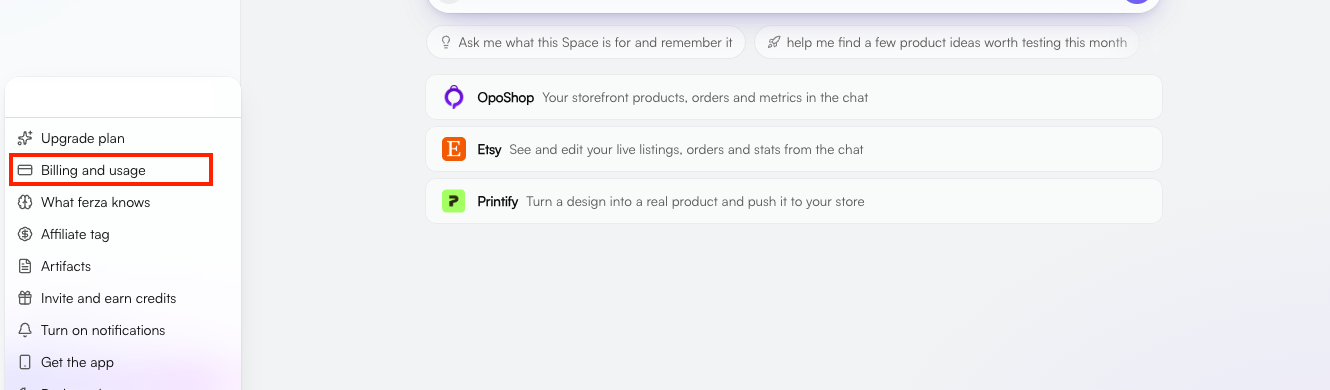

When you run out, you can:
- Use a limit reset (Max and Ultra) to refill this week straight away. Usage limit resets, click Use reset, then Confirm within 5 seconds.
- Buy more usage in Billing and Usage. Extra usage is used straight away and never expires.
- Upgrade to a bigger plan.
- Wait for your next refill.
New sellers who have never paid for Ferza can get their first month of Max for $36. It then renews at $100 a month unless cancelled.
What Ferza can't do (yet)
Knowing Ferza's limits helps you get the best from it.
- It can't log in to Etsy Shop Manager or other sites as you. It works with your Etsy shop through its official connection, and can read public pages, but it never uses your passwords.
- It can't pay or buy anything for you. It won't enter payment details or complete purchases.
- It can't guarantee Etsy results. Search rankings, sales and Etsy's policy decisions are outside anyone's control.
- It can't see private data without a connection. Connect your shop first for anything about your own listings, orders or analytics.
- It can make mistakes. Review suggestions, especially titles, tags and prices, before you approve them. If a keyword or number matters, ask Ferza to show you the search data behind it.
Tips for the best results
- Be specific. "Find 5 Halloween shirt niches with under 5,000 competing listings" works better than "find me ideas".
- Ask for research first. For listings, say "check the search volume for each tag before you suggest it" so every keyword is backed by data.
- Tell Ferza about your business once. Your niche, audience, style and no-gos. Ask it to remember them and every new chat will know.
- Connect your shop early. Ferza can then use your real listings, orders and numbers instead of general advice.
- Read the approval card. It shows exactly what will change. Approve only what you're happy with.
- Attach files with your question. Ferza reads a file best in the message you attach it to.
- Start a new chat for a new task. Long chats on many topics use more credits and are harder for Ferza to follow.
FAQs
Q: Will Ferza change my listings without asking? Not in chat.
A: Edits wait on an approval card, new products are published only after you confirm, and you can ask Ferza to undo listing changes afterwards. A scheduled routine makes changes on its own only if you set it up that way.
Q: Is using Ferza allowed on Etsy?
A: Yes. Etsy bans listings with no human involvement, not AI tools. You choose what to make and confirm changes before they go live. Follow the checklist in Selling on Etsy with AI above.
Q: Where do Ferza's keyword numbers come from?
A: From EverBee Research: monthly Etsy search volume, competition and a keyword score. Connect your EverBee account to use it.
Q: Can I share a chat with someone?
A: Yes. Ask Ferza to "share this chat" and it creates a public, read-only link to the conversation as it is now.
Q: Why did my credits drop on Max or Ultra?
A: Credits on these plans now arrive a week at a time. You get the same amount over a month. Check Billings and Usage for your refill time.
Q: Do unused credits roll over?
A: Weekly and monthly credits don't. Extra usage you buy never expires.
Getting help
You can ask Ferza itself how something in the app works. For anything else, contact the EverBee support team.To help us help you faster, include your account email, what you asked Ferza and a screenshot of what happened.