

EverBee's Etsy research engine is now available as an MCP connector for ChatGPT, bringing EverBee's shop, listing, product, and keyword research directly into your ChatGPT conversations.
This guide explains what the EverBee Research MCP is, what you can ask it, and how to connect it to ChatGPT.
What is the EverBee Research MCP?
MCP (Model Context Protocol) lets ChatGPT connect with external tools and use their data directly in a conversation.
With EverBee Research connected, ChatGPT can pull live Etsy research from EverBee to help you explore shops, listings, products, keywords, and other research insights without leaving the chat.
With the EverBee Research MCP connected, ChatGPT can:
- Shop intelligence: Analyze Etsy shops, sales, revenue, conversion rates, reviews, and more.
- Product & listing research: Discover top sellers, trends, competitive listings, and analyze tags.
- Keyword & SEO research: Explore search volume, competition, keyword scores, related keywords, and manage saved collections.
You can ask questions in natural language without having to switch between ChatGPT and EverBee.
Common questions you can ask ChatGPT
Once connected, you can use ChatGPT to explore EverBee’s Etsy research data as part of a normal conversation.
For example, you could ask:
- “Give me an overview of this Etsy shop and its estimated revenue.”
- “What are some top-performing reusable water bottle listings right now?”
- “Find keyword opportunities for boho wall art and tell me how competitive they are.”
- “Which tags are bringing traffic to this listing?”
- “Compare this shop with my competitor and highlight the biggest differences.”
- “Save these listings to my Favourites and create a folder for my Q4 gift ideas.”
You can also build on your questions as you go. Ask ChatGPT to dig deeper, compare results, find related keywords, or organize your research. There’s no specific format you need to follow. Just ask your questions naturally, and EverBee Research can provide the Etsy data behind the conversation.
How to connect the EverBee Research MCP to ChatGPT
The setup for ChatGPT is slightly different from the setup for Claude. Follow the steps below to connect EverBee Research.
1. Open ChatGPT, Click on your profile name --> then settings--> Plugins--> enable Developer mode
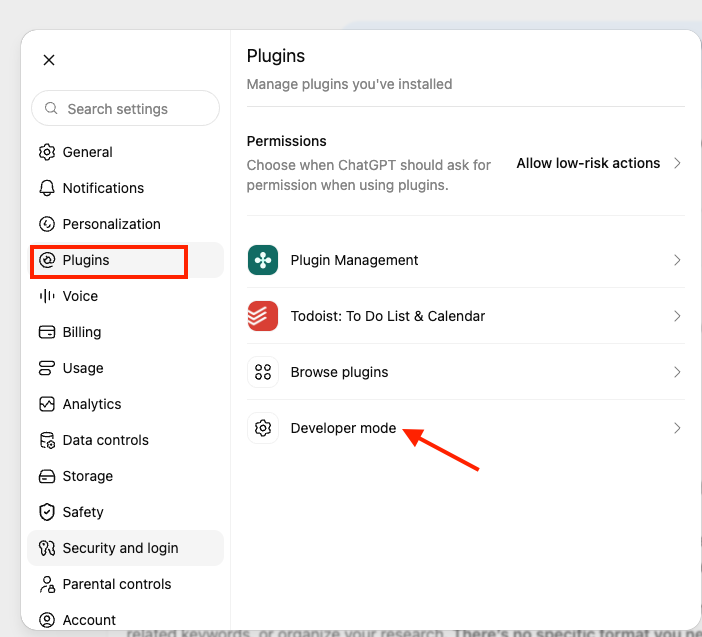
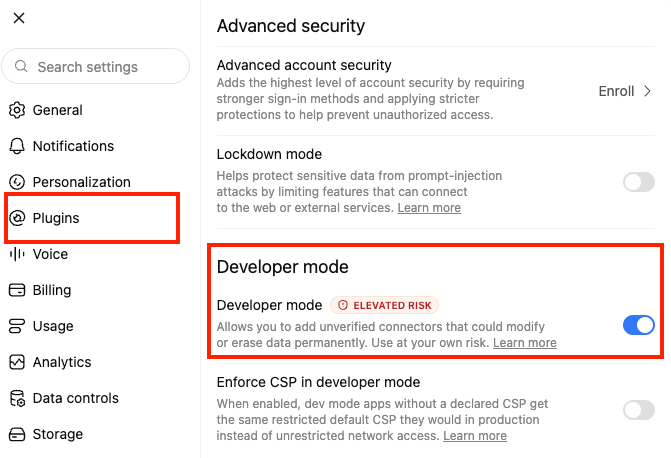
Note: You need to enable Developer Mode manually before adding the EverBee Research MCP.
2. After enabling Developer Mode, return to the plugins section --> click on browse plugin --> then the plus icon. This will open the page where you can add a new connection, then you can proceed to enter the details:
Name: EverBee Research
Connection - Server URL: https://research-mcp.everbee.com/mcp
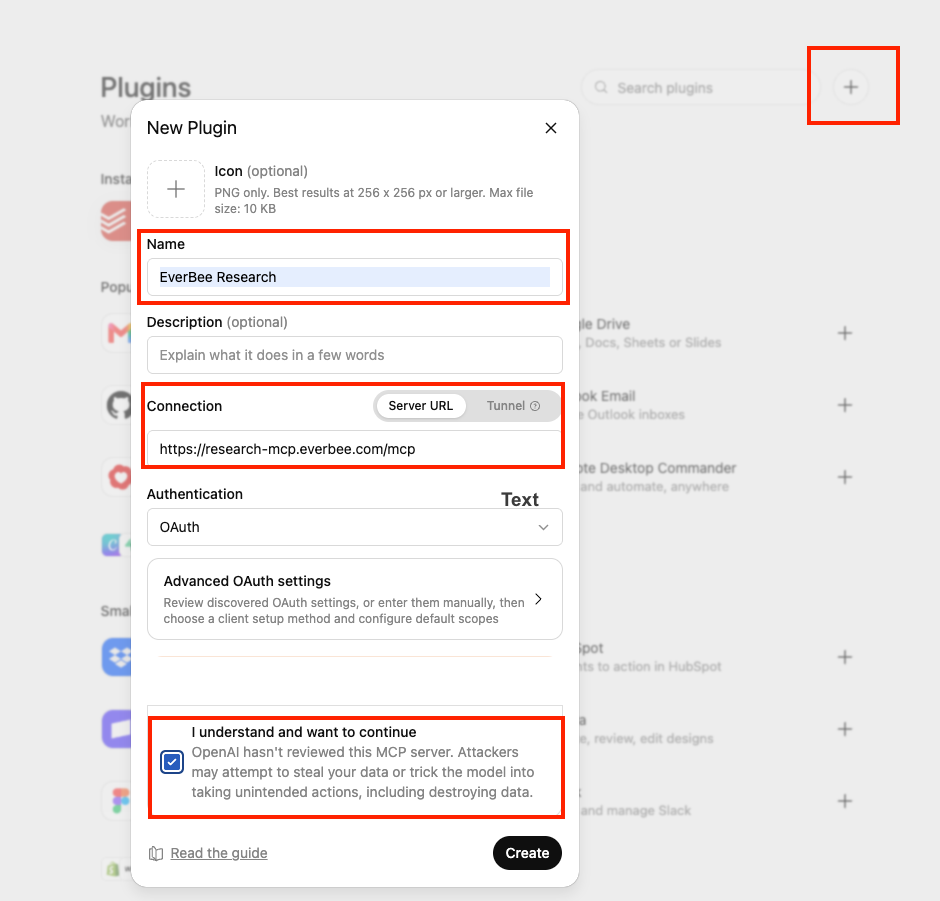
You can also find the MCP server URL in the AI Connectors section of your EverBee Research dashboard.
Note: Make sure you accept the required terms, then continue.
3. Once you hit create, you'll be redirected to EverBee to authorize the EverBee Research MCP. Review the requested permissions and click Approve to allow ChatGPT to access your EverBee Research data.
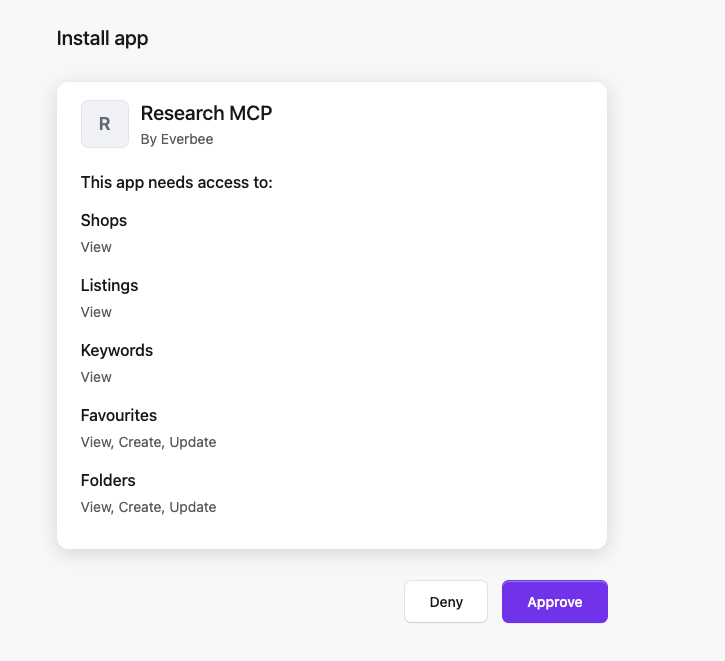

And you're all set once access has been approved, the EverBee Research MCP will be connected to ChatGPT.
You can now use ChatGPT to ask questions and perform research using EverBee data.
Try asking:
"Find trending keywords for reusable water bottles."
Or:
"Find the top 5 listings for personalized dog gifts and save them to my Favourites."
Once EverBee Research is connected to ChatGPT, you can start using your EverBee data in your conversations right away. There’s no separate API setup or coding involved.
The main difference between the ChatGPT and Claude integrations is how you connect them. For ChatGPT, you’ll enable Developer Mode and add EverBee Research through the Plugins section.
After the connection is active, ChatGPT can access the supported EverBee research tools and return Etsy insights directly in your chat.
------------------------------------------------------------------------------------------------------------------------------------------------------
FAQ
- Q: Do I need an EverBee account to use this?
A: Yes. You'll need to be logged in to your EverBee account when you approve access, since the MCP connects to your EverBee Research data.
- Q: What can the MCP access?
A: The MCP can access the EverBee Research data and actions included in the permissions you approve during setup, including supported shop, listing, keyword, Favourite, and Folder data.
- Q: Is this the same data as the EverBee app?
A: Yes. The EverBee Research MCP uses the same research engine that powers shop analytics, listing analytics, and keyword research inside EverBee.
- Q: Can I use the MCP with both ChatGPT and Claude?
A: Yes. EverBee Research can be connected to both ChatGPT and Claude. The setup process is different for each AI assistant.
- Q: Do all EverBee plans have access to the MCP?
A: No. The EverBee Research MCP is available on Growth and Business plans only.
- Q: Something isn't working. Where can I get help?
A: Reach out to EverBee Support at hello@everbee.io with a description of what you tried to do and what happened. We'll help you troubleshoot the connection.
- Q: Can I find the ChatGPT connection details in EverBee?
A: The EverBee Research MCP server URL is available in your AI Connectors section. ChatGPT support is currently being added to this area, so the page may not yet show ChatGPT-specific instructions.
- Q: Why don't I see ChatGPT listed under AI Connectors?
A: ChatGPT support is currently being added to the AI Connectors page. We're updating the page to provide separate connection instructions for ChatGPT, Claude, and other supported AI assistants.