

EverBee's Etsy research engine, the same data that powers shop analytics, listing analytics, and keyword research inside the EverBee app, is now available as an MCP (Model Context Protocol) connector. Once it's connected, you can ask Claude for Etsy research directly in a chat, and Claude will pull live data from EverBee to answer.
This guide covers what the EverBee Research MCP is, what you can ask it, and how to connect it in Claude.
What is the EverBee Research MCP?
MCP is an open standard that lets AI assistants like Claude connect directly to a tool's live data instead of relying only on what you type or paste in. Think of it as a plug: once EverBee Research is connected, Claude can look up real shop, listing, and keyword data on demand, no exporting spreadsheets, no switching tabs.
With the EverBee Research MCP connected, Claude can:
- Look up shop intelligence: Sales, revenue, conversion rate, review scores, and more for any Etsy shop
- Research listings and products: Surface top-selling products, growth trends, and visibility scores for competitive analysis
- Pull keyword and SEO data: Search volume, competition, and keyword scores, either as broad research or suggestions seeded from a term
- Analyze tags: See which tags on a listing are actually driving traffic
- Manage saved collections: Read and organize favorite shops, listings, or keywords into folders
It's built for Etsy sellers, so you can ask in plain language instead of digging through reports.
Common questions you can ask Claude
Once it's connected, try asking Claude things like these, organized by what EverBee Research can look up:
- Shop intelligence
- "How is [shop name] performing? What's their estimated monthly revenue?"
- "What's [shop name]'s review score and conversion rate?"
- "Compare my shop's performance to [competitor shop]."
- Listing & product research
- "What are the top-selling reusable water bottle listings on Etsy right now?"
- "Which handmade candle listings are trending up this month?"
- "What's the visibility score on this listing?"
- Keyword & SEO research
- "Find trending keywords for boho wall art."
- "What's the search volume and competition for 'personalized dog tag'?"
- "Suggest keywords related to 'minimalist jewelry.'"
- Tag analysis
- "Which tags on this listing are actually driving traffic?"
- Favourites & folders
- "Save the top 5 listings for this search into my Favourites."
- "Create a folder called 'Q4 gift ideas' and add these listings to it."
You don't need to phrase things exactly like the examples above; Claude will understand natural, conversational questions about your shop, your competitors, or a product category you're researching.
How to connect the EverBee Research MCP in Claude
The EverBee Research MCP connects to Claude (web and desktop app) as a custom connector. Here's how to set it up:
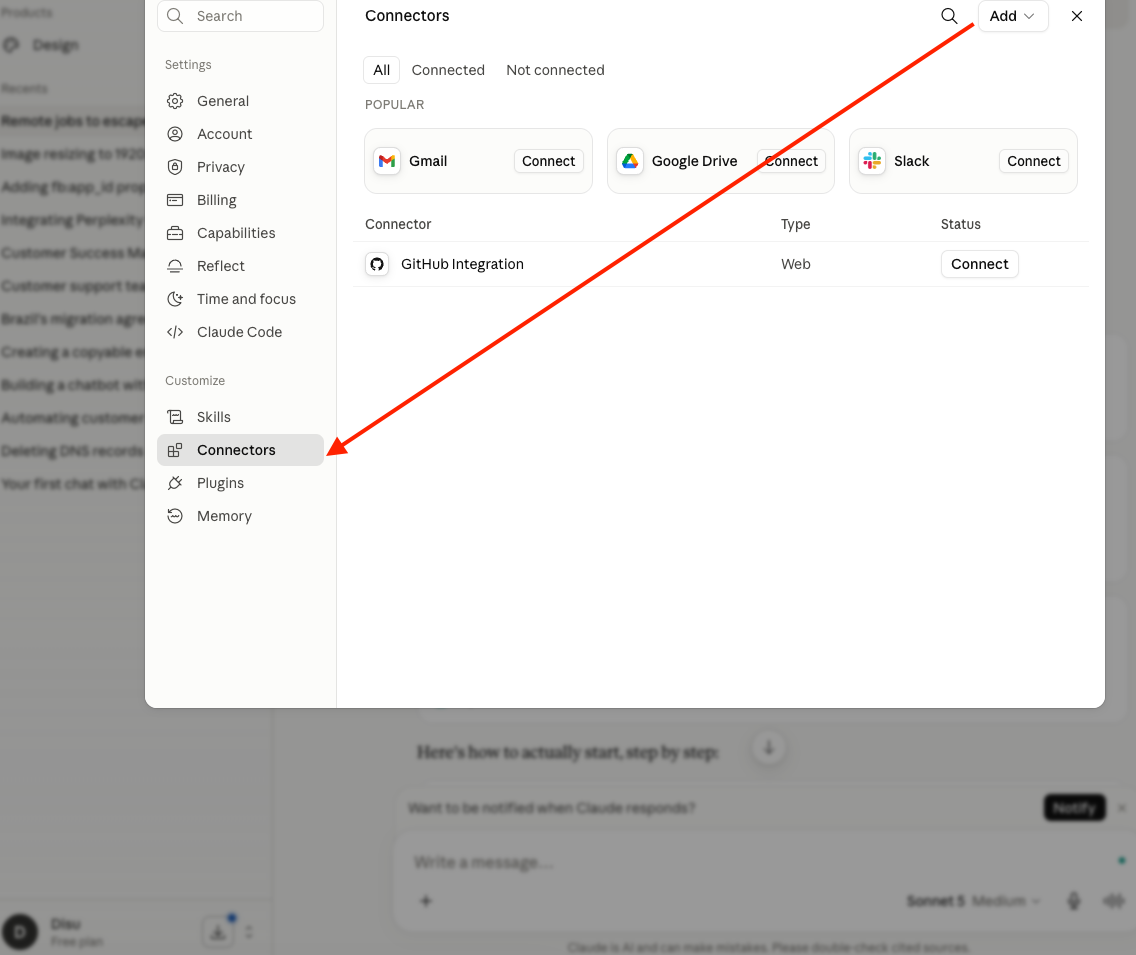
- Open/log in to Claude, click your name in the bottom-left corner, then go to Settings → Connectors.

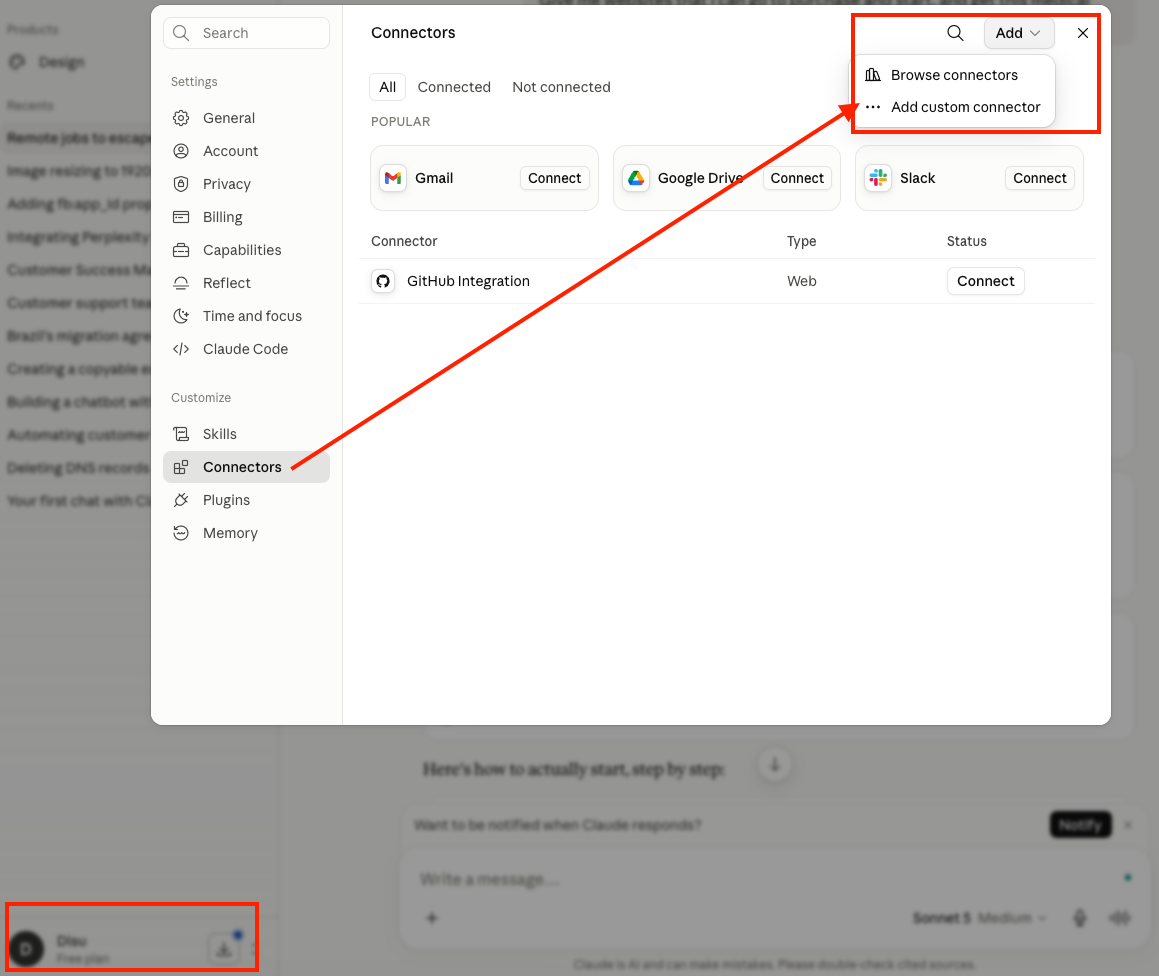
- Add a custom connector by clicking Add in the top-right corner, then choose Add custom connector.
- Go back to your EverBee AI Connector, then copy and paste the connector details into Claude.
- Name: EverBee Research
- Remote MCP server URL: https://research-mcp.everbee.com/mcp
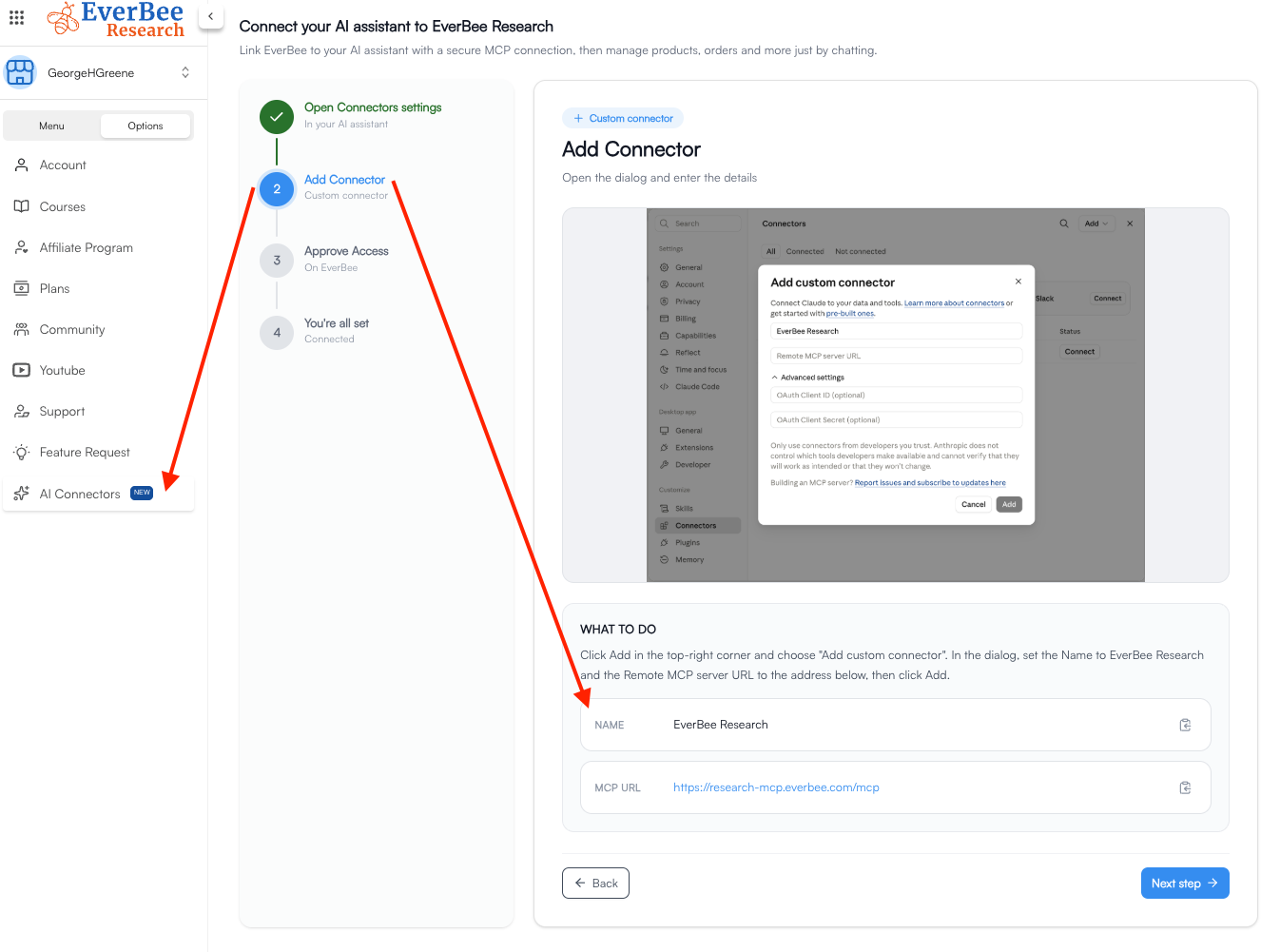
Then click Add.
- Go back to EverBee to approve access. You'll be redirected to EverBee to grant EverBee Research access to your research data. It will ask for:
- Shops - View
- Listings - View
- Keywords - View
- Favourites - View, Create, Update
- Folders - View, Create, Update
Review the list, then click Approve.
- You're all set. Claude will confirm the MCP is connected. Try asking: "Find trending keywords for reusable water bottles" or "Save the top 5 listings for this search into my Favourites."
That's it, no code, no API keys to manage yourself.
Note: The EverBee Research MCP currently connects to Claude. Support for other AI assistants is on the way, and we'll update this guide when that lands.
-----------------------------------------------------------------------------------------------------------------------------------------------
FAQ
- Q: Do I need an EverBee account to use this?
A: Yes, you'll need to be logged in to your EverBee account when you approve access, since the MCP reads from your EverBee research and Favorites data.
- Q: What can the MCP actually access?
A: Only what you approve during setup: viewing your shops, listings, and keyword data, and viewing/creating/updating your Favourites and Folders. You can review these permissions again anytime from your Claude Connectors settings.
-Q: Is this the same data as the EverBee app?
A: Yes, it's the same research engine that powers shop analytics, listing analytics, and keyword tools inside EverBee, just accessible directly through Claude.
- Q: Something's not working, where do I get help?
A: Reach out to EverBee support with a description of what you tried to ask and what happened, and we'll help you troubleshoot the connection.
-Q: Can all plans use the MCP?
-A: No. The MCP is available on Growth and Business plans only.